这一篇我们继续上一次的内容 进行 HTML 文档的解析 没看上一章的小伙伴一定要看一下浏览器原理系列第一篇: 解析http请求的内容
首先我们了解一下浏览器处理页面的流程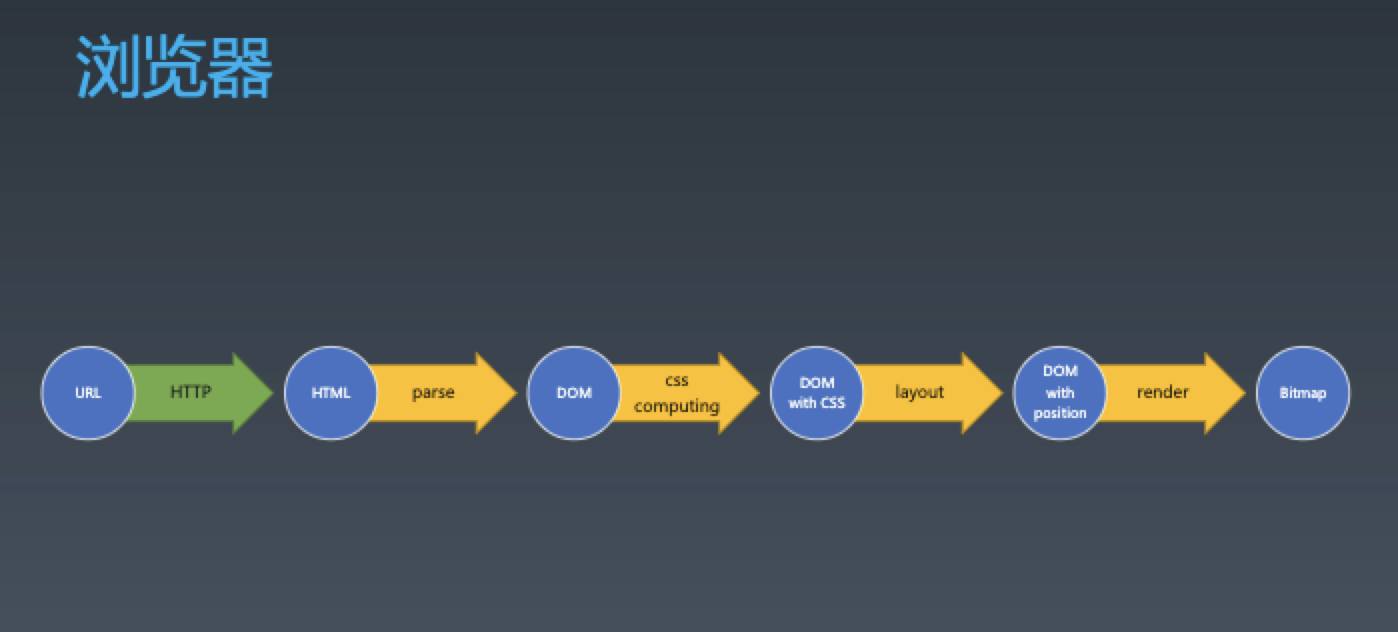
我们今天要实现的就是 HTML 的 parse 阶段
首先我们先将上篇文章中讲到的 server 和 client 中的附上 方便大家去调试
Server
const http = require("node:http");
const server = http.createServer((req, res) => {
  res.setHeader("Content-Type", "text/html");
  res.setHeader("X-Foo", "bar");
  res.writeHead(200, { "Content-Type": "text/plain" });
  console.log("request received");
  res.end(`<html maaa=a >
  <head>
      <style>
  body div #myid{
      width:100px;
      background-color: #ff5000;
  }
  body div img{
      width:30px;
      background-color: #ff1111;
  }
   div #myid{
    width:40px;
    background-color: #ff5000;
}
html body div img.img1{
    width:40px;
    background-color: #ff5000;
}
html body div .img2{
    width:400px;
    background-color: blue;
}
body div img.img2.img3#myid{
    width:50px;
    background-color: #ff5000;
}
      </style>
  </head>
  <body>
      <div>
          <img id="myid" class="img2 img3"/>
          <img class="img1 img2"/>
      </div>
  </body>
  </html>`);
});

server.listen(8088);
Client
const net = require('node:net')
const parser = require('./domParse.js')

class ResponseParser {
  constructor() {
    this.WAITING_STATUS_LINE = 0
    this.WAITING_STATUS_LINE_END = 1
    this.WAITING_HEADER_NAME = 2
    this.WAITING_HEADER_SPACE = 3
    this.WAITING_HEADER_VALUE = 4
    this.WAITING_HEADER_LINE_END = 5
    this.WAITING_HEADER_BLOCK_END = 6
    this.WAITING_BODY = 7
    this.current = this.WAITING_STATUS_LINE
    this.headers = {}
    this.headerName = ''
    this.headerValue = ''
    this.statusLine = ''
    this.bodyParser = null
  }

  get isFinished () {
    return this.bodyParser && this.bodyParser.isFinished
  }

  get response () {
    this.statusLine.match(/HTTP\/1.1 ([0-9]+) ([\s\S]+)/)
    return {
      statusCode: RegExp.$1,
      statusText: RegExp.$2,
      headers: this.headers,
      body: this.bodyParser.content.join('')
    }
  }

  receive (string) {
    for (let i = 0; i < string.length; i++) {
      this.receiveChar(string.charAt(i))
    }
  }

  receiveChar (char) {
    if (this.current === this.WAITING_STATUS_LINE) {
      if (char === '\r') {
        this.current = this.WAITING_STATUS_LINE_END
      } else if (char === '\n') {
        this.current = this.WAITING_HEADER_NAME
      } else {
        this.statusLine += char
      }
    } else if (this.current === this.WAITING_STATUS_LINE_END) {
      if (char === '\n') {
        this.current = this.WAITING_HEADER_NAME
      }
    } else if (this.current === this.WAITING_HEADER_NAME) {
      if (char === ':') {
        this.current = this.WAITING_HEADER_SPACE
      } else if (char === '\r') {
        this.current = this.WAITING_HEADER_BLOCK_END
        if (this.headers['Transfer-Encoding'] === 'chunked') {
          this.bodyParser = new TrunkedBodyParser()
        }
      } else {
        this.headerName += char
      }
    }
    else if (this.current === this.WAITING_HEADER_BLOCK_END) {
      if (char === '\n') {
        this.current = this.WAITING_BODY
      }
    } else if (this.current === this.WAITING_HEADER_SPACE) {
      if (char === ' ') {
        this.current = this.WAITING_HEADER_VALUE
      }
    } else if (this.current === this.WAITING_HEADER_VALUE) {
      if (char === '\r') {
        this.current = this.WAITING_HEADER_LINE_END
        this.headers[this.headerName] = this.headerValue
        this.headerName = this.headerValue = ''
      } else {
        this.headerValue += char
      }
    } else if (this.current === this.WAITING_HEADER_LINE_END) {
      if (char === '\n') {
        this.current = this.WAITING_HEADER_NAME
      }
    } else if (this.current === this.WAITING_BODY) {
      this.bodyParser.receiveChar(char)
    }
  }
}
class TrunkedBodyParser {
  constructor() {
    this.WAITING_LENGTH = 0
    this.WAITING_LENGTH_LINE_END = 1
    this.READING_TRUNK = 2
    this.WAITING_NEW_LINE = 3
    this.WAITING_NEW_LINE_END = 4
    this.length = 0
    this.content = []
    this.isFinished = false
    this.current = this.WAITING_LENGTH
  }
  receiveChar (char) {
    if (this.current === this.WAITING_LENGTH) {
      if (char === '\r') {
        if (this.length === 0) {
          this.isFinished = true
        }
        this.current = this.WAITING_LENGTH_LINE_END
      } else {
        this.length *= 16
        this.length += parseInt(char, 16)
      }
    } else if (this.current === this.WAITING_LENGTH_LINE_END) {
      if (char === '\n') {
        this.current = this.READING_TRUNK
      }
    } else if (this.current === this.READING_TRUNK) {
      if (/[^\r\n]/.test(char)) {
        this.content.push(char)
      }
      this.length--
      if (this.length === 0) {
        this.current = this.WAITING_NEW_LINE
      }
    } else if (this.current === this.WAITING_NEW_LINE) {
      if (char === '\r') {
        this.current = this.WAITING_NEW_LINE_END
      }
    } else if (this.current === this.WAITING_NEW_LINE_END) {
      if (char === '\n') {
        this.current = this.WAITING_LENGTH
      }
    }
  }
}
class Request {
  constructor(options) {
    const defaultOptions = {
      method: 'GET',
      body: {},
      host: 'localhost',
      path: '/',
      port: 80,
      headers: {
        'Content-Type': 'application/x-www-form-urlencoded'
      }
    }
    options = {
      defaultOptions,
      ...options
    }
    Object.keys(defaultOptions).forEach(key => {
      this[key] = options[key]
    })
    if (this.headers['Content-Type'] === 'application/json') {
      this.bodyText = JSON.stringify(this.body)
    }

    if (this.headers['Content-Type'] === 'application/x-www-form-urlencoded') {
      this.bodyText = Object.keys(this.body)
        .map((key) => {
          return `${key}=${encodeURIComponent(this.body[key])}`
        })
        .join('&')
      this.headers['Content-Length'] = this.bodyText.length
    }
  }
  toString () {
    return `${this.method} ${this.path} HTTP/1.1\r
${Object.keys(this.headers).map((key) => `${key}: ${this.headers[key]}`).join('\r\n')}\r
\r
${this.bodyText}`
  }
  send () {
    return new Promise((resolve, reject) => {
      const parser = new ResponseParser()

      // 创建新的TCP连接
      const connection = net.createConnection(
        {
          host: this.host,
          port: this.port,
        },
        () => {
          console.log('Connected to server!')
          connection.write(this.toString())
        }
      )

      // 处理响应数据
      connection.on('data', (data) => {
        console.log('Response data:', data.toString())
        parser.receive(data.toString())
        console.log('isFinished:', parser?.isFinished)
        if (parser.isFinished) {
          console.log('Parsed response:', parser.response)
          resolve(parser.response)
          connection.end()
        }
      })

      // 错误处理
      connection.on('error', (err) => {
        console.log('Connection error:', err)
        reject(err)
        connection.end()
      })

      // 连接结束
      connection.on('end', () => {
        console.log('Disconnected from server')
        reject(new Error('Disconnected from server'))
      })

    })
  }
}


void async function () {
  let request = new Request({
    method: 'POST',
    host: '127.0.0.1',
    port: 8088,
    body: {
      a: '1',
    },
    headers: {
      'Content-Type': 'application/x-www-form-urlencoded'
    },
    path: '/'
  })

  let response = await request.send()
  let dom = parser.parseHTML(response.body)
  console.dir(JSON.stringify(dom, null, '  '))
}()
将服务器起来之后 我们开始分析如何去做 HTML 文档的解析
首先我们是采用一个有限状态机的方式去解析 HTML 的文档 我们先来介绍一下状态机相关的一些知识
有限状态机
- 每个状态都是一个机器
- 每个机器都可以做计算、存储、输出
- 所有的机器接受的输入一致
- 状态机的每个机器本身没有状态(纯函数)
- 每个机器知道下一个状态
- 每个机器都有确定的下一个状态(Moore) (摩尔型状态机)
- 每个机器根据输入决定下一个状态(Mealy) (米利型状态机)
这是有限状态机的一些定义 我们今天要使用的就是米利型状态机 也就是根据输入决定我们的下一个状态
- 每个函数是一个状态 函数参数是输入 在函数中可以自由的编写代码 处理每个状态的逻辑 函数中的返回值作为下一个状态
我们是做一个简易的解析来了解浏览器是如何工作的 所以我们不去考虑太多其他的情况 我们先来看一下 HTML 的标准中有多少种状态 这里我们参考whatwg中 Tokenization 中的状态定义!
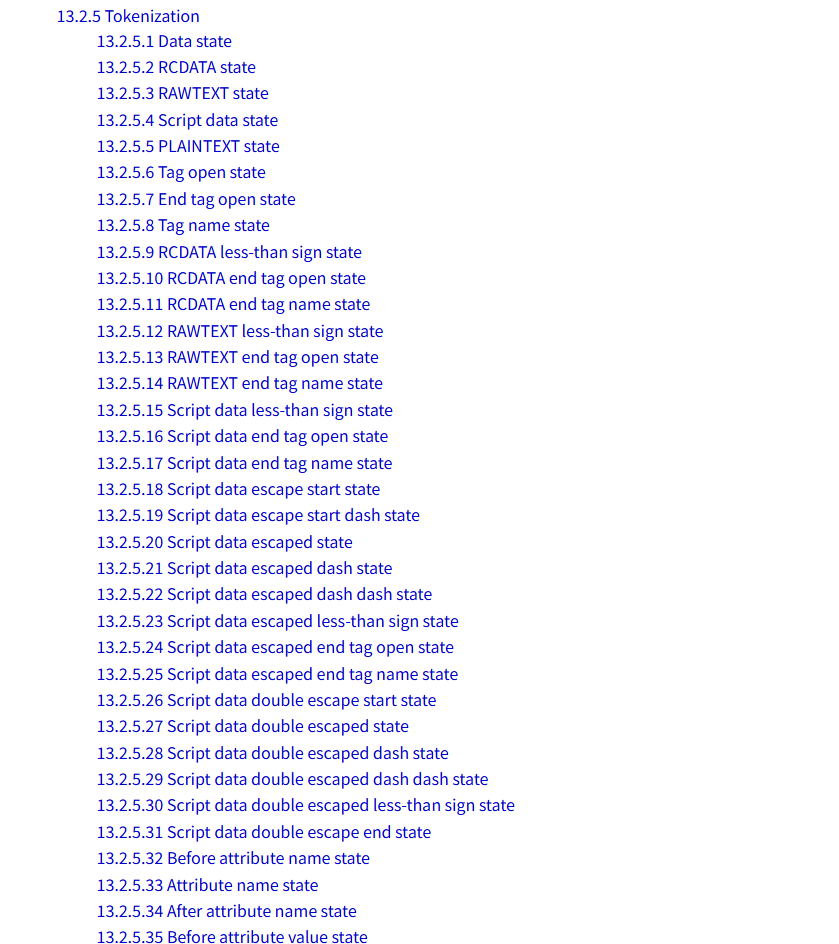
HTML 共有 80 种状态 但是很多状态对我们不太重要比如对与 DOCTYPE、 RCDATA、COMMENT 之类的解析 这里我们只取其中的最重要一些状态对其做一个简单解析 主要是以下几种
- 13.2.5.6 Tag open state
- 13.2.5.7 End tag open state
- 13.2.5.8 Tag name state
- 13.2.5.32 Before attribute name state
- 13.2.5.33 Attribute name state
- 13.2.5.34 After attribute name state
- 13.2.5.35 Before attribute value state
- 13.2.5.36 Attribute value (double-quoted) state
- 13.2.5.37 Attribute value (single-quoted) state
- 13.2.5.38 Attribute value (unquoted) state
- 13.2.5.39 After attribute value (quoted) state
- 13.2.5.40 Self-closing start tag state
每一种状态在 whatwg 都可以找到 并且有明确的状态转移流程 这里大家如果想更加完备的解析 可以自行参考 whatwg 中的文档 下面我们直接上代码 具体思路会直接在注释中标明
const EOF = Symbol('EOF') // End of file 是一个文件结束的标志
const stack = [{type: 'document',children: []}]// 这里我们栈中首先加入了一个根元素 是因为一个正确的栈在我们对DOM匹配结束之后会空掉 我们用一个根元素来接收我们生成的DOMTree
let currentToken = null // 当前的Token
let currentAttribute = null // 当前属性
let currentTextNode = null // 当前的文本节点
// emit方法用来向栈中推送当前解析的token
function emit (token) {
  let top = stack[stack.length - 1]// 取出栈中的最后一个 如果当前token是开始标签 这个top元素就是当前元素的父元素 如果token是结束标签 拿这个元素去和top比对是否匹配即可
  switch (token.type) {
	// 这里的逻辑是如果是一个开始标签 我们要初始化一个元素 元素的标签名就是当前token的标签名
    case 'startTag':
      let element = {
        type: 'element',
        children: [],
        attributes: [],
        tagName: token.tagName
      }
   // 遍历token的属性 映射到我们生成的元素中去
      for (const p in token) {
        if (p !== 'type' && p !== 'tagName') {
          element.attributes.push({
            name: p,
            value: token[p]
          })
        }
      }

      top.children.push(element)
 		// 如果不是一个自闭合标签 将这个元素推入栈中 自闭合标签视为自己和自己匹配成功相当于直接出栈了
      if (!token.isSelfClosing) {
        stack.push(element)
      }
	// 初始化当前的文本节点
      currentTextNode = null
      break
    case 'endTag':
	// 如果和栈中最后一个元素不匹配 说明标签没有正确的书写
      if (top.tagName !== token.tagName) {
        throw new Error(`Tag start end does'n match`)
      } else {
		// 如果匹配到 将最后一个元素出栈
        stack.pop()
      }
      currentTextNode = null
      break
    case 'text':
	// 如果当前文本节点为null 就初始化一个文本节点 文本节点就直接推入父元素的children中
      if (currentTextNode === null) {
        currentTextNode = {
          type: 'Text',
          content: ''
        }
        top.children.push(currentTextNode)
      }
      currentTextNode.content += token.content
      break
  }

}
// 这个相当于我们的入口 中间开始的每个状态机中的业务逻辑和状态流转都可以在whatwg中的文档找到 大家可以自行对照文档理解
function data (c) {
  if (c === '<') {
    return tagOpen
  } else if (c === EOF) {
    emit({
      type: 'EOF'
    })
    return
  } else {
    emit({
      type: 'text',
      content: c
    })
    return data
  }
}

function tagOpen (c) {
  if (c === '/') {
    return endTagOpen
  } else if (c.match(/^[a-zA-Z]$/)) {
    currentToken = {
      type: 'startTag',
      tagName: ''
    }
    return tagName(c)
  } else {
    return
  }
}

function endTagOpen (c) {
  if (c.match(/^[a-zA-Z]$/)) {
    currentToken = {
      type: 'endTag',
      tagName: ''
    }
    return tagName(c)
  } else if (c === '>') {
  } else if (c === EOF) {
  } else {
    return data
  }
}

function tagName (c) {
  if (c.match(/^[\t\n\f ]$/)) {
    return beforeAttributeName
  } else if (c === '/') {
    return selfClosingStartTag
  } else if (c.match(/^[a-zA-Z]$/)) {
    currentToken.tagName += c
    return tagName
  } else if (c === '>') {
    emit(currentToken)
    return data
  } else {
    return tagName
  }
}

function beforeAttributeName (c) {
  if (c.match(/^[\t\n\f ]$/)) {
    return beforeAttributeName
  } else if (c === '=') {
  } else if (c === '>' || c === '/' || c === EOF) {
    return afterAttributeName(c)
  } else {
    currentAttribute = {
      name: '',
      value: ''
    }
    return attributeName(c)
  }
}

function afterAttributeName (c) {
  if (c.match(/^[\t\n\f ]$/)) {
    return beforeAttributeName
  } else if (c === '>') {
    return endTagOpen
  } else if (c === EOF) {
  } else if (c === '/') {
    return selfClosingStartTag
  } else {
    return beforeAttributeName
  }
}

function attributeName (c) {
  if (c.match(/^[\n\t\f ]$/) || c === '/' || c === '>' || c === EOF) {
    return afterAttributeName(c)
  } else if (c === '=') {
    return beforeAttributeValue
  } else if (c === '\u0000') {
  } else if (c === '"' || c === "'" || c === '<') {
  } else {
    currentAttribute.name += c
    return attributeName
  }
}

function beforeAttributeValue (c) {
  if (c.match(/^[\n\t\f ]$/) || c === '/' || c === '>' || c === EOF) {
    return afterAttributeValue(c)
  } else if (c === '"') {
    return doubleQuotedAttributeValue
  } else if (c === "'") {
    return singleQuotedAttributeValue
  } else if (c === '>') {
  } else {
    return unquotedAttributeValue(c)
  }
}

function doubleQuotedAttributeValue (c) {
  if (c === '"') {
    currentToken[currentAttribute.name] = currentAttribute.value
    return afterQuotedAttributeValue
  } else if (c === '\u0000') {
  } else if (c === EOF) {
  } else {
    currentAttribute.value += c
    return doubleQuotedAttributeValue
  }
}

function singleQuotedAttributeValue (c) {
  if (c === "'") {
    currentToken[currentAttribute.name] = currentAttribute.value
    return afterQuotedAttributeValue
  } else if (c === '\u0000') {
  } else if (c === EOF) {
  } else {
    currentAttribute.value += c
    return singleQuotedAttributeValue
  }
}
function afterQuotedAttributeValue (c) {
  if (c.match(/^[\n\t\f ]$/)) {
    currentToken[currentAttribute.name] = currentAttribute.value
    return beforeAttributeName
  } else if (c === '/') {
    currentToken[currentAttribute.name] = currentAttribute.value
    return selfClosingStartTag
  } else if (c === '>') {
    currentToken[currentAttribute.name] = currentAttribute.value
    emit(currentToken)
    return data
  }  else if (c === EOF) {
  } else {
    currentAttribute.value += c
    return doubleQuotedAttributeValue
  }
}
function unquotedAttributeValue (c) {
  if (c.match(/^[\n\t\f ]$/)) {
    currentToken[currentAttribute.name] = currentAttribute.value
    emit(currentToken)
    return beforeAttributeName
  } else if (c === '/') {
    currentToken[currentAttribute.name] = currentAttribute.value
    return selfClosingStartTag
  } else if (c === '>') {
    currentToken[currentAttribute.name] = currentAttribute.value
    emit(currentToken)
    return data
  } else if (c === '"' || c === "'" || c === '<' || c === '=' || c === '`') {
  } else if (c === '\u0000') {
  } else if (c === EOF) {
  } else {
    currentAttribute.value += c
    return unquotedAttributeValue
  }
}

function selfClosingStartTag (c) {
  if (c === '>') {
    currentToken.isSelfClosing = true
    emit(currentToken)
    return data
  } else if (c === EOF) {
    return beforeAttributeName
  } else {
  }
}

module.exports.parseHTML = function parseHTML (html) {
	// 初始状态
  let state = data
  for (let c of html) {
	// 把接收到的每个字符依次传递给状态机做处理
    state = state(c)
  }
	// 处理完之后要加入一个文档结束的标识符
  state = state(EOF)
  return stack
}
我们执行这段代码来看一下我们解析是否正确
[
  {
    "type": "document",
    "children": [
      {
        "type": "element",
        "children": [
          {
            "type": "Text",
            "content": " "
          },
          {
            "type": "element",
            "children": [
              {
                "type": "Text",
                "content": "      "
              },
              {
                "type": "element",
                "children": [
                  {
                    "type": "Text",
                    "content": "  body div #myid{      width:100px;      background-color: #ff5000;  }  body div img{      width:30px;      background-color: #ff11
11;  }   div #myid{    width:40px;    background-color: #ff5000;} html body div img.img1{    width:40px;    background-color: #ff5000;} html body div .img2{    wid
th:400px;    background-color: blue;} body div img.img2.img3#myid{    width:50px;    background-color: #ff5000;}      "
                  }
                ],
                "attributes": [],
                "tagName": "style"
              },
              {
                "type": "Text",
                "content": "  "
              }
            ],
            "attributes": [],
            "tagName": "head"
          },
          {
            "type": "Text",
            "content": "  "
          },
          {
            "type": "element",
            "children": [
              {
                "type": "Text",
                "content": "      "
              },
              {
                "type": "element",
                "children": [
                  {
                    "type": "Text",
                    "content": "          "
                  },
                  {
                    "type": "element",
                    "children": [],
                    "attributes": [
                      {
                        "name": "id",
                        "value": "myid"
                      },
                      {
                        "name": "class",
                        "value": "img2 img3"
                      },
                      {
                        "name": "isSelfClosing",
                        "value": true
                      }
                    ],
                    "tagName": "img"
                  },
                  {
                    "type": "Text",
                    "content": "          "
                  },
                  {
                    "type": "element",
                    "children": [],
                    "attributes": [
                      {
                        "name": "class",
                        "value": "img1 img2"
                      },
                      {
                        "name": "isSelfClosing",
                        "value": true
                      }
                    ],
                    "tagName": "img"
                  },
                  {
                    "type": "Text",
                    "content": "      "
                  }
                ],
                "attributes": [],
                "tagName": "div"
              },
              {
                "type": "Text",
                "content": "  "
              }
            ],
            "attributes": [],
            "tagName": "body"
          },
          {
            "type": "Text",
            "content": "  "
          }
        ],
        "attributes": [
          {
            "name": "maaa",
            "value": "a"
          }
        ],
        "tagName": "html"
      }
    ]
  }
]
小结
在这一篇中,我们学习并实现了 HTML文档解析 的过程:
- 基于有限状态机实现HTMLTokenizer
- 将Token转换为DOM树
这样,我们更清晰地理解了浏览器在获取 HTML 文档后,如何一步步地将其转化为可操作的 DOM 结构。
下一篇文章中,我们会继续在这个基础上,实现 CSS样式计算(computing阶段) 的代码。
